
Dashboard
golem ui opens a dashboard in your browser for the plugin in the current folder:
vendor/bin/golem ui Golem dashboard for HelloWorld
http://127.0.0.1:41207/?token=6a2e7d79…
Local only: the dashboard runs on this machine. Ctrl+C to stop.It runs on your machine, on the plugin as it is on disk: nothing is uploaded anywhere, and the dashboard uses the same Golem as the command line. Stop it with Ctrl+C.
Try it
The demo is the dashboard itself, replaying runs recorded on Golem's example plugin: run the tests (one fails on purpose), open the failure and the coverage, start the fuzzer (it finds a real bug) or a benchmark, build a scenario.
 Open the live demo →
Running tests
The side panel lists the tests found in your tests folder, each with a checkbox: tick the classes and tests to run (or All, None, Failed to keep only those that failed last time); the choice is kept in your browser for next time. Then pick the PocketMine-MP version or fork, the number of servers, coverage, and run:
- results arrive live, grouped by class, and the side panel shows what passed or failed;
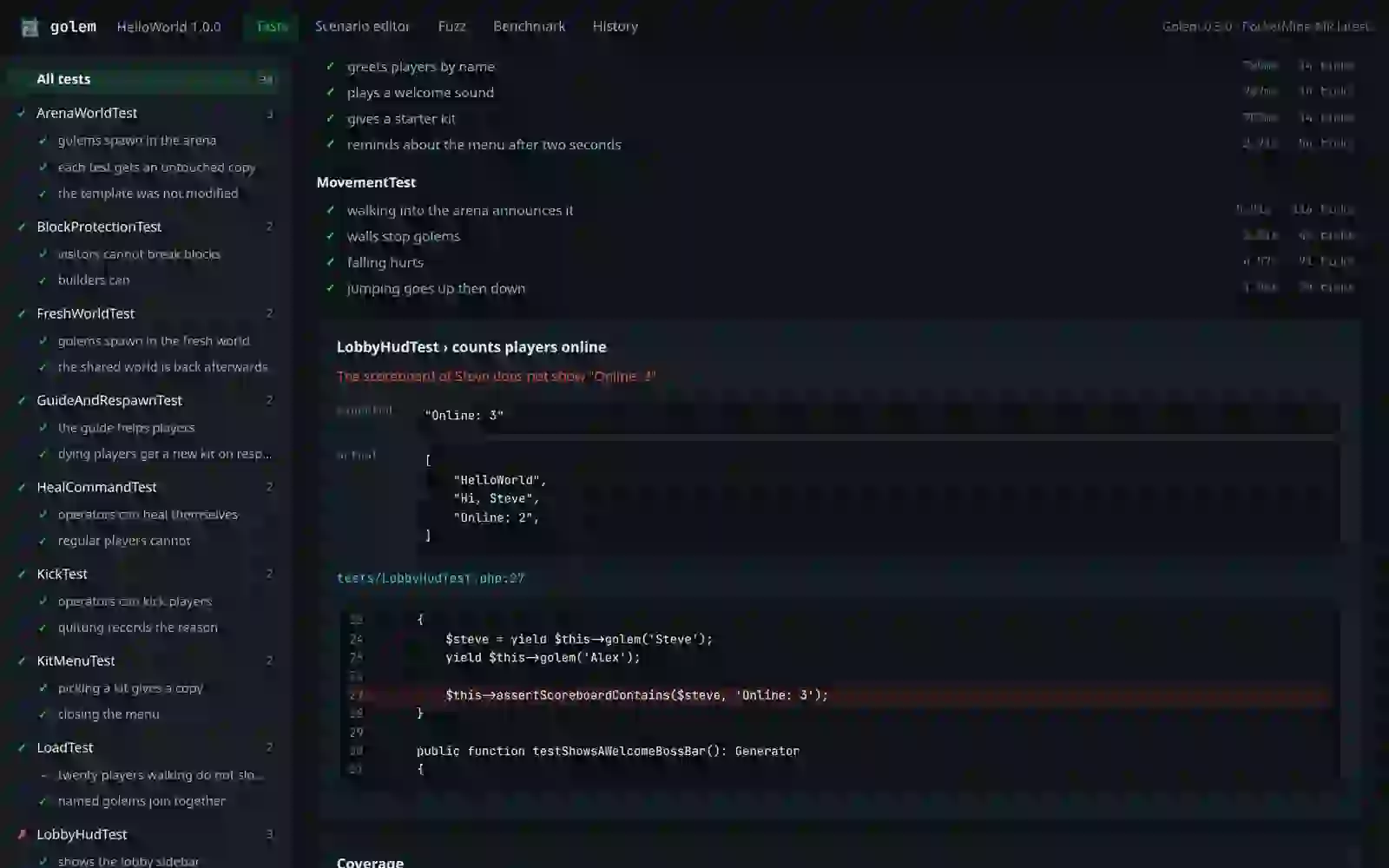
- click a test to see its failure: the message, expected and actual values, and the code around the line that failed;
- with coverage, the commands and listeners never reached, the share of lines run per file, and each file's code with the lines that ran in green and the others in red;
- the console output of the run is there too, as the command line prints it.
Tick Watch to keep it running: whenever a file of src/, tests/ or resources/ changes, the tests you picked run again on their own, as soon as your editor has finished saving. Repeat and Random order run them several times, shuffled, to find flaky tests.
Building a test without writing PHP
The Scenario editor builds a test from golems and steps:
- the golems, with their name, operator status and game mode;
- actions: run a command, chat, click a form button or a window slot, walk, jump, break or right-click a block next to them, be given an item, attack another golem, leave, wait;
- checks: a message received (or not), a form or window open, an item held, health, game mode, title, action bar, scoreboard, permission, online, offline or kicked, the server's TPS.
The test it writes is shown as you go. Write the test saves it in your tests folder, in the namespace of your other tests; Write and run also runs it and shows the result, with the expected and actual values when a check fails. Drafts are kept in your browser, so you can come back to them; once written, the test is a regular PHP file to commit and edit like any other.
Fuzzing and benchmarks
The Fuzz tab runs golem fuzz with its duration, number of golems and seed, and shows the actions and crashes as they come, the seed to replay the run, and the tests written for each crash.
The Benchmark tab runs golem bench: the TPS and tick usage of each step fill a chart and a table as golems join, then the plugin's slowest listeners and tasks are listed. The chart also shows your previous benchmarks, faded, to see whether a change made things slower.
Mutation testing
The Mutation tab runs golem mutate: each mutant appears as a square, green when the tests caught it and red when it survived, and the survivors are listed with the line they changed.
History
Every run started from the dashboard is kept in the History tab, with its settings and result: Run again starts it once more, with the same settings, and a star pins the runs you use often so they are never dropped. Your benchmarks are drawn together, to follow the plugin's performance over time.
The history, the drafts of the scenario editor and the benchmarks are kept in your browser only (its local storage): clearing the site's data clears them.
Options
| Option | Default | Description |
|---|---|---|
--port=<port> | a free port | The port to listen on |
--no-open | Do not open the browser, only print the link |
--path, --tests and --pocketmine work as for golem run.
Security
The dashboard can run Golem and write tests in your project, so only you can reach it: it listens on 127.0.0.1 only, answers only to requests addressed to 127.0.0.1 or localhost (a website cannot reach it through its own domain name), and every call must carry the token from the link golem ui printed, which other websites open in your browser cannot read or send.